Moving a Wordpress Install

June 14th, 2008

One of my clients recently purchased new servers and wanted to migrate all their sites to the new servers. Some of these sites were wordpress powered. Thankfully, I found this article that made the move a breeze.

The critical thing I want to save for my future reference is the following sql lines from that post:

UPDATE wp_options SET option_value = replace(option_value, 'http://www.old-domain.com', 'http://www.new-domain.com') WHERE option_name = 'home' OR option_name = 'siteurl';
UPDATE wp_posts SET guid = replace(guid, 'http://www.old-domain.com','http://www.new-domain.com');
UPDATE wp_posts SET post_content = replace(post_content, 'http://www.old-domain.com', 'http://www.new-domain.com');

See the post on My Digital Life for the full instructions :)

Get Wordpress to use sendmail instead of mail()

June 3rd, 2008

Same project I just mentioned below - something funky was going on with Wordpress not sending emails. I had a server admin looking at the server and I’d submit a comment on the corporate blog and no emails would get sent. I even tried using a plugin that forced wordpress to use SMTP, still would not send emails from the blog.

I found on the support forums where someone mentioned a hack to get Wordpress to use sendmail. In wp-includes folder open the file pluggable.php. Around line 362 is the following:

// Set to use PHP's mail()
$phpmailer->IsMail();

Change that to:
// Set to use PHP's mail()
//$phpmailer->IsMail();
$phpmailer->IsSendmail();

As soon as I did that - voila - it started sending emails.

(yes, I know, I’m modifying core code again. Tell me how to make this a plugin and I will!)

Pulling in post content from a separate blog install

June 3rd, 2008

I had a site I was using Wordpress for - and it actually involved two separate installs. One install was set up as the main content management for the site. Pages were obviously the pages of the site. Posts were for news and Press Release articles. A separate install was for the “corporate blog.”

I had one page where I listed the news and PR items, and I was asked to also list the latest blog posts on that page as well. Since the blog was actually an entirely different install, this presented the problem. The critical issue here is that both Wordpress installs are in the same database - just with different prefixes. This makes the problem pretty easy to deal with.

So just to go over the other aspect of the page - listing the news and Press Releases - that is simple. I get the id of the categories (lets say that news has an id of ‘5′ and PR has and id of ‘6′) on the page template I create especially for that page I have the following:

<h3>News</h3>
<?php
global $post;
//category=5 - this is the id for news
$myposts = get_posts('numberposts=5&category=5');
foreach($myposts as $post) :
?>
<p><a href="<?php the_permalink(); ?>"><?php the_title(); ?></a><br />
<em><?php the_time('F jS, Y') ?></em></p>
<?php endforeach; ?>
<h3>Press Releases</h3>
<?php
global $post;
//category=6 - this is the id for Press Releases
$myposts = get_posts('numberposts=5&category=6');
foreach($myposts as $post) :
?>
<p><a href="<?php the_permalink(); ?>"><?php the_title(); ?></a><br />
<em><?php the_time('F jS, Y') ?></em></p>
<?php endforeach; ?>

Now to pull in the post content from the other blog - you need to a swap in the prefix you’re using for the other install (where I have “BLOGPREFIX” below). Also had to manipulate the URL given by “get_permalink()”. See my note below in the code.

<h3>Blog Posts</h3>
<?php
$querystr = "SELECT * FROM BLOGPREFIX_posts WHERE post_status = 'publish' AND post_type = 'post' ORDER BY post_date DESC limit 5";
$blogposts = $wpdb->get_results($querystr, OBJECT);
if ($blogposts): ?>
<?php foreach ($blogposts as $post): ?>
<?php setup_postdata($post); ?>
<?php /*
Normally you use the_permalink() to display the URL -
but that would show the post as if it was part of the
current blog. In my case, the blog was actually set up
as a subdomain. There may be a better way to do this but
I just stripped out the domain and replaced it with the
blog's subdomain. See below */
$newpermalink = str_replace("http://www.MYDOMAIN.com","http://BLOG.MYDOMAIN.com",get_permalink()); ?>
<p><a href="<?php echo $newpermalink; ?>"><?php the_title(); ?></a><br />
<em><?php the_time('F jS, Y') ?></em></p>
<?php endforeach; ?>
<?php else : ?>
<p> Not Found</p>
<?php endif; ?>

That will pull the last 5 blog entries - with the title linked to the post and the date below it.

Proportional Scaling Calculator

May 13th, 2008

I’m sure this has been done before since it’s pretty simple - I just couldn’t find it quick enough when I needed it. And since it is so simple, it was easier to just create my own personal little calculator than dig around, find one, bookmark. (or worse yet, do the math on a little sticky note next to my computer) ;P

This calculator will let you enter in the original width and height of an image (or document, video or whatever). Then you enter the width (or height) of the size you need it scaled to (down or up). And it will tell you what the other side needs to be.

For example: I have an 800×600 image - I need it scaled down to fit in a 256 width area… what height will I need to make it? This tool will answer your question.

Proportional Scaler Calculator

Phone number validation with jquery

May 3rd, 2008

One of the things I’ve been playing around with a lot recently is jquery. Why I didn’t jump on this bandwagon sooner, I’m not sure, but I am kicking myself for it. So I am still a bit of nub on the jquery front - but I like to think I pick things up quickly. :D

So one thing I am now using jquery regularly for is form validation. Previously, form validation used to mean a lot of script writing, not to mention a fair amount of dread.

Now it’s quite painless.

My current usage of that plugin is pretty basic until I get a better handle of it. But one thing that I have been requested a number of times, is to add validation for a phone number - which is not included in that plugin. I’m not sure this is the “right” or best way to do it - but it does work. :)

The functions are basically the same as those provided here with some minor modifications and altered to be used with the jquery plugin.

First of course you include the jquery javascript file:
<script language="javascript" type="text/javascript" src="/js/jquery.min.js"></script>

Then the validation plugin:
<script type="text/javascript" src="/js/jquery.validate.pack.js"></script>

Then you add the function to check the phone number:
<script type="text/javascript">
$.validator.addMethod("phone", function(phone_number, element) {
var digits = "0123456789";
var phoneNumberDelimiters = "()- ext.";
var validWorldPhoneChars = phoneNumberDelimiters + "+";
var minDigitsInIPhoneNumber = 10;
s=stripCharsInBag(phone_number,validWorldPhoneChars);
return this.optional(element) || isInteger(s) && s.length >= minDigitsInIPhoneNumber;
}, "Please enter a valid phone number");

Some “helper” functions:
function isInteger(s)
{ var i;
for (i = 0; i < s.length; i++)
{
// Check that current character is number.
var c = s.charAt(i);
if (((c < "0") || (c > "9"))) return false;
}
// All characters are numbers.
return true;
}
function stripCharsInBag(s, bag)
{ var i;
var returnString = "";
// Search through string's characters one by one.
// If character is not in bag, append to returnString.
for (i = 0; i < s.length; i++)
{
// Check that current character isn't whitespace.
var c = s.charAt(i);
if (bag.indexOf(c) == -1) returnString += c;
}
return returnString;
}

Then the line that makes the jquery run:
$(document).ready(function() {
$("#myform").validate();
});
</script>

To use the jquery validation plugin - I was just adding “required” as a class to those fields that were required. Like this:
<input type="text" name="FirstName" class="required" />

You can check email structure by also adding the class “email”.
<input type="text" name="EmailAddress" class="required email" />

And now, using the code above, if you add the class “phone” - it will check a phone number.
<input type="text" name="PhoneNumber" class="required phone" />

(My code above allows for some additional characters beyond just numbers - so that it will accept parens around the area code - dashes or periods between the numbers and “e” “x” “t” characters as well - in case someone needs to include an extension.)

Typical disclaimer - like I said - I’m still a nub at jquery. There may be a better/easier way to do the above, so as always feel free to chime in if you know what that better/easier way is…

Updated 5/5/08 I do see a “phone” method in the “additional-methods.js” file… but I needed it do things a little differently… (like allowing extension numbers etc.)

Updated 5/29/08 Had some issues with the method not allowing phone fields to be optional and only checking the values if something was entered (when optional). Fixed that now.

Updated 7/1/08 As JT noted in the comments with regex this can be simplified. JT provided the following code:
function isValidPhoneNumber(ph) {
if (ph == null) {
return false;
}
var stripped = ph.replace(/[\s()+-]|ext\.?/gi, “”);
// 10 is the minimum number of numbers required
return ((/\d{10,}/i).test(stripped));
}

So to update the jquery:
$.validator.addMethod("phone", function(ph, element) {
if (ph == null) {
return false;
}
var stripped = ph.replace(/[\s()+-]|ext\.?/gi, “”);
// 10 is the minimum number of numbers required
return ((/\d{10,}/i).test(stripped));
}, “Please enter a valid phone number”);

And then you can loose the other “helper” functions. (Thanks JT!!)

Suckerfish Dropdown navigation going behind content

May 3rd, 2008

Awhile back, I had a project where I created a nice clean (X)HTML page including navigation using UL and LI tags. A few months later the client decided they wanted to add a dropdown menu to the navigation. No problem, I thought. We just add the embedded lists to the navigation - style it with CSS - and use the Suckerfish dropdown menu technique. Easy Peasy.

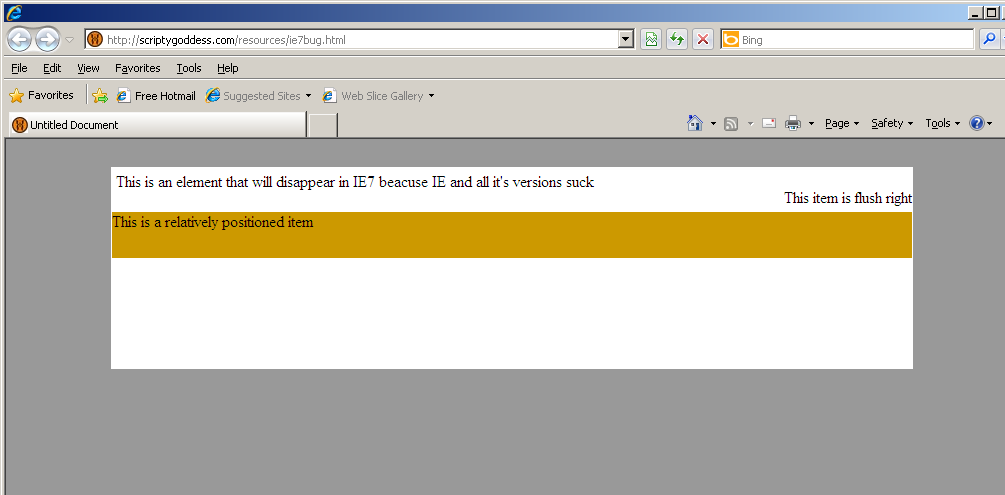
Except when I implemented it, the drop down menus were showing up BEHIND the rest of the content instead of “above/over it”.

There was a lot of other things going on in the page, I have a simple example that demonstrates the issue.

I’m sure it makes sense somehow, if I had a better grasp of what “position: relative” does to the document - beyond that “position: relative” allows items INSIDE a relatively positioned block to be absolutely positioned WITHIN it (which is why I had done that). The side effect though is that it does that crazy thing with the menu.

Oh the HOURS and HOURS to figure that out…. /sigh.

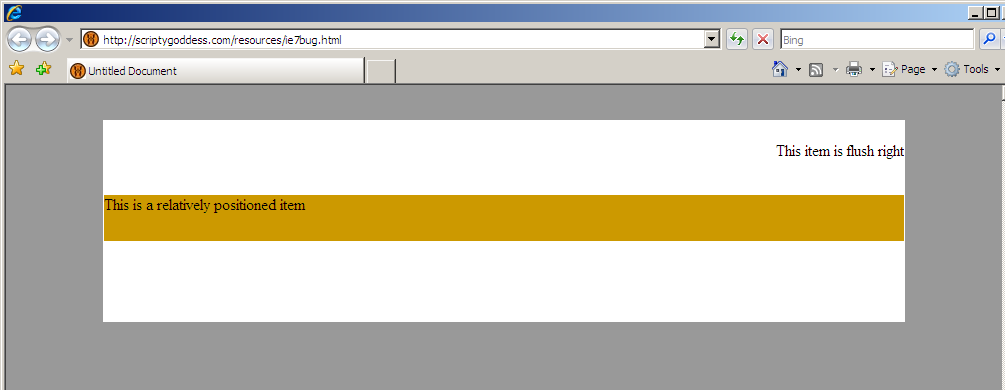
Here is the same page - with just that one line (position: relative) removed.

I’ve now seen this problem crop up a few times. In one case, I was working with a design that I had not originally created and even though there were no “position: relative” in any of the css files - the only way to get the menu to be ABOVE the content was to explicitly declare “position: static” inside the div tag itself. (Even just declaring it in the css wouldn’t fix it - somewhere else it must have still been getting overridden)

While I’m at the point where I can’t even imagine designing a page using a table based layout anymore, I still get hit with some CSS sticking points that I just don’t get. So if you have more insight on this feel free to elaborate in the comments. I’m just so glad I was able to get the menu working!

Submit is Not a Function (and getting links to submit all forms in CubeCart)

March 15th, 2008

“Why am I getting that Javascript error?? WTH is it talking about - submit IS a function!!”

So here’s the deal - if you have a form and an element in the form is named “submit” - if you try to call document.myform.submit() - you’ll end up getting the “submit is not a function” javascript error. (Because to javascript - “submit” is now that object element in your form - not a function)

So the simple solution is if you plan on using the javascript function submit() - do not name any of your form elements “submit”.

That’s all well and good except if you’re working on code that isn’t completely yours - and if the PHP code to process the form is specifically looking for $_POST['submit'] like so:

if (isset($_POST['submit'])) { // process form }

then you now have another problem.

This was the case I ran into with CubeCart recently. Most of the forms do not require a submit element to be in the form in order to process it - but a handful did. The design I was working on needed all the buttons designed and to look the same. So my options were:

1) Just use the regular input type=”submit” button on those forms. (Ok - but then the site is inconsistent)

2) search for all instances of (isset($_POST['submit']) in the code and change it to some other element I can add to the page… ie:

<input type="hidden" name="formsubmitted" />

and then in the code:

if (isset($_POST['formsubmitted'])) { // process form }

(Obviously this is not recommended in the case of CubeCart as it will make it really annoying to maintain/upgrade the cart!)

3) add that other “formsubmitted” element I noted above to the pages that need it - then towards the top of the MAIN index.php page (which is called with all pages on the store) add the following:

if (isset($_POST['formsubmitted'])) $_POST['submit'] = 1;

Thereby setting the value of $_POST['submit'] so it will process the form…

Another tip with using css-styled links for buttons that will submit forms in CubeCart - you don’t need to use document.FORMNAME.submit() - from any form you can use their “submitDoc(’FORMNAME’)” function like so:

<a href="javascript:submitDoc('FORMNAME');" class="myButtonStyle">Send Form</a>

Just make sure the form has a name (some of them don’t).

How to make a progress/goal (thermometer-like) bar graph with PHP

February 23rd, 2008

On one of my projects recently, they needed a dynamic bar graph that would show the progress towards a goal of donations. I’ve never done something like that before, and it turns out it’s actually pretty simple to do. I’ll explain how the code works and then include everything at the end.
Read the rest of this entry »

Buyer Beware! Do not host with HostICan!

February 12th, 2008

Rather than clean up this post - which was updated throughout my ordeal with them - I wanted to summarize the problem I had when I was hosted with HostICan.

When I first switched to them, they seemed great at the time. I was very happy. I even signed up as an affiliate and recommended them, sent clients to them. A few months after I signed up however, the problems began…

At first I got a threatening email from them saying my site was using too much CPU/Memory. I could not get any kind of helpful response via email so I finally called them. The guy I spoke to said it was a momentary spike - everything was fine - lets see if it happens again.

A few weeks (?) later, it happened again. Again, I called and was told to install wp-cache and that should fix the problem. So I did.

I had a few more back and forths with them. The end result was that starting in 2008 I think they changed their monitoring systems, from a threatening email - to simply taking your whole site down.

My site has not had a massive increase in posts, or visitors in a few years. In fact, because I’ve been so busy, posting here has been less and less, and number of visitors has roughly averaged the same or less.

Simply put, I wasn’t happy with their service anymore. In my previous post, people said “What do you expect when you pay ~$6 for hosting” (Actually I had paid more than that - but whatever). No matter what - if that’s the service you get with cheap hosting - so be it. But what happened next is inexcusable.

On their site, they say that if you’re not happy, you can get your money back… they ALSO say that if you are not happy within 30 days - you can get a full refund. Well, I’m not looking for a full refund, but since I paid for TWO YEARS up front, and the service obviously isn’t working for me anymore - I would like to get a prorated refund. This is standard policy with every host provider I have ever contacted. On their site the “30 day RISK FREE money back guarantee” wording - is COMPLETELY SEPARATE from their “Service guarantee”:

SERVICE GUARANTEE:
We guarantee that we’ll provide quality service:

* 99.9% Uptime Guarantee
* 24/7/365 Phone & Email Support
* Your satisfaction or your money back. (emphasis mine)

When I canceled I asked for my prorated refund, and I was told I would get nothing because I was canceling outside the 30-day window. Their friendly response:
You seem to miss one vital thing “30 day money back guarantee” and this applies within the 30 days “Your satisfaction or your money back.” not within 7 months.

They want to massively restrict CPU and take everyone’s site down - I guess, sure, thats what you get with cheap hosting - but to put up a VERY misleading “SERVICE GUARANTEE” - and keep hundreds of dollars for hosting I’m obviously not getting/using… This is a good business practice??

Whatever the restriction is on CPU usage - it was so tight that I had A LOT of problems getting my database off their system… I would try to export the database, and it wouldn’t let me… I had to manually export most of the rows for my posts and comments in small increments - and even then it skipped a few. It’s also interesting to note that if you browse around on their forums, you’ll see a bunch of people complaining of this problem.

People - be forewarned… This is not just cheap hosting… this is a BAD BUSINESS. I STRONGLY advise against hosting with them.

To iPhone or not to iPhone

February 6th, 2008

I’m seriously contemplating getting an iPhone. This is kind of funny for two reasons - 1) 2 years ago I swore off pda phones. I never carried it with me, because the bulky pda phone I had did not fit in my pocket, and if I couldn’t just grab it and throw it in my pocket when I quickly dashed out of the house - it would never come with me - and a mobile phone isn’t so useful when you’re mobile and it’s stuck at home. 2) When they announced the iPhone I thought it looked pretty cool, but didn’t think I’d ever have a use for it. My little phone worked just fine - it made calls. At the time that’s all I needed it for. Then I added a text messaging plan… and then the ability to check emails - the last two worked but the little phone wasn’t really good at doing anything other than the original purpose - make calls. I tried to get it to connect to google maps… I only tried once, it was a major pain and really didn’t work.

When my brother showed me his iPhone a few months ago, and I saw how cool it was, I definitely had gadget envy. The touch screen wasn’t as confusing as it looked on demo videos. The keyboard I found easier to use than I expected (and WAY easier than txt msg with only 13 buttons). My cell phone plan is up and quite frankly I’m unimpressed with any of the new Verizon phones…

So I was just wondering for anyone who stops by here - if you have an iPhone - do you like it? Why? Can you just throw it in your pocket easily enough? I use a PC - how does it do for syncing with the PC? Where do you store your address book - how well does it sync with the iPhone?